See exactly how your email renders. On real devices
EmailQA renders your HTML email on real devices across Gmail, Outlook, Apple Mail, and more, in both Light Mode and Dark Mode. Catch rendering bugs before your subscribers do. Starting at $20/month instead of ~$500+.
No credit card required
Why real device rendering matters
Simulators guess. Real devices show the truth. Here's what you miss without real device testing.
Font rendering differences
Every OS renders fonts differently. A heading that looks great on Mac can look completely wrong on Windows Outlook. Real devices catch this.
Dark mode color shifts
Email clients rewrite your colors in Dark Mode, sometimes unpredictably. See the actual Dark Mode output, not a CSS approximation.
Mobile layout breaks
Responsive emails can break in subtle ways on real phones. Media query support varies wildly between Gmail Android and Apple Mail iOS.
Outlook rendering quirks
Classic Outlook on Windows uses the Word rendering engine. The new Outlook for Windows is built on Outlook on the web, and Outlook on Mac uses WebKit. They produce very different results from the same HTML.
Supported email clients and devices
Every render is captured on a real device. Light Mode and Dark Mode included.
Desktop Clients
Mobile Clients
Same email, completely different output
Here's what happens when your subscriber opens your email in Dark Mode. Outlook on Mac inverts colors, shifts backgrounds, and can make entire sections unreadable.
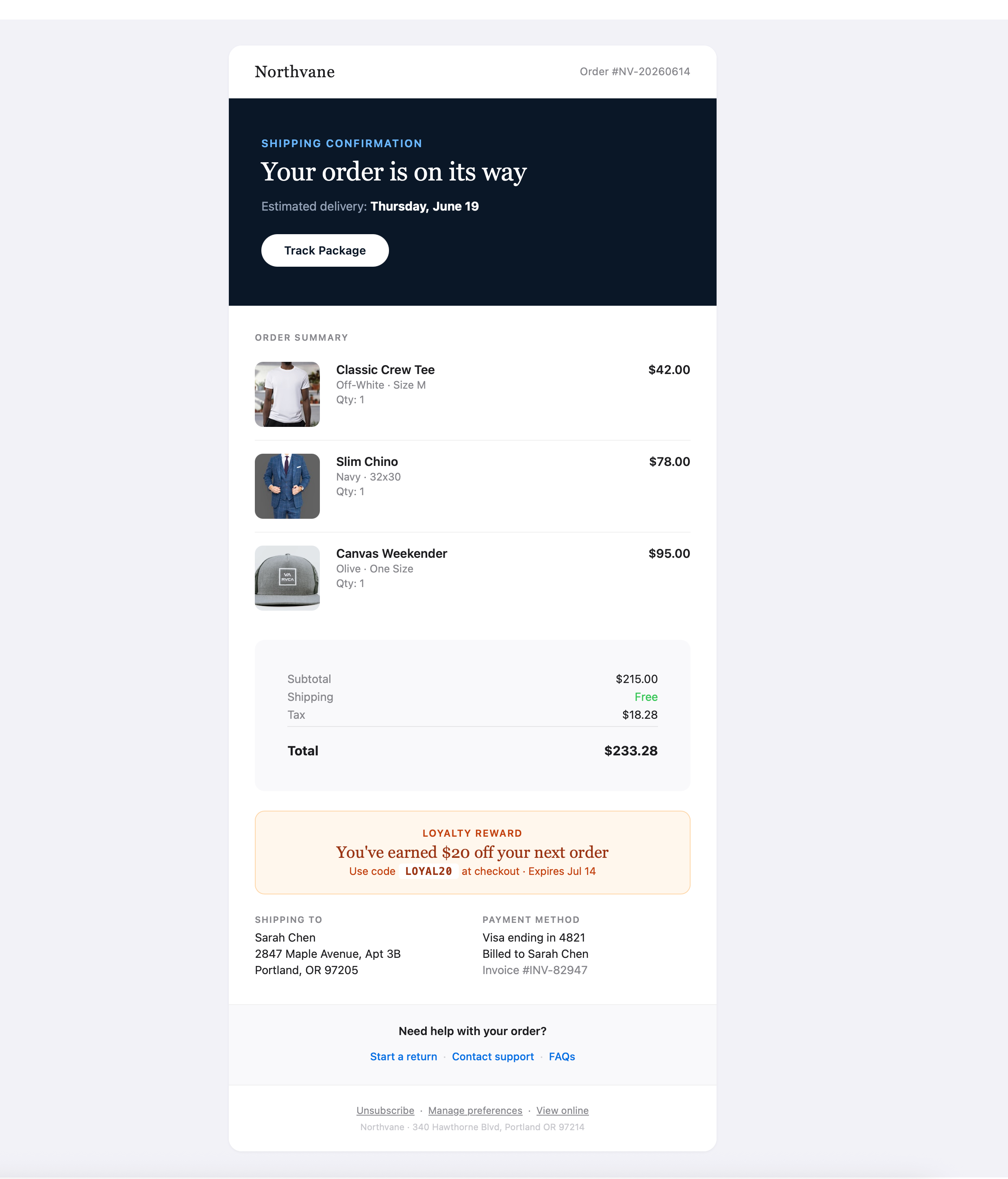
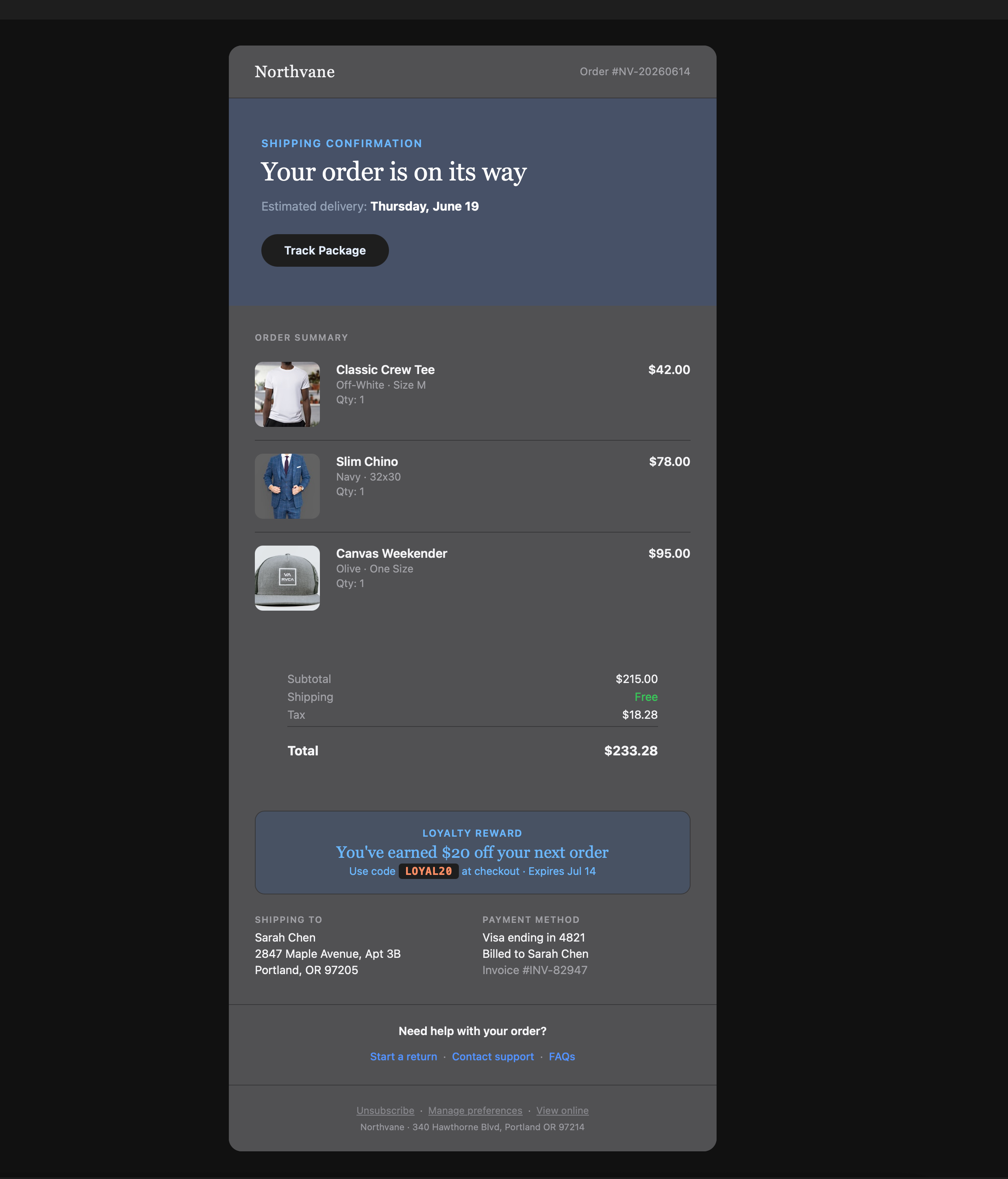
The hero gradient, promo banner colors, and background tones are all altered by Dark Mode. Without testing, you'd never know.
How each email client renders differently
No two email clients render HTML the same way. Here's what to watch for in each client, and why testing on real devices is the only way to catch these issues.
Outlook on Windows (classic and new)
Classic Outlook on Windows uses Microsoft Word as its rendering engine, not a browser. This means CSS properties like background-image, flexbox, and border-radius simply don't work. Padding on images behaves differently, and max-width is ignored entirely. If your email uses modern CSS, classic Outlook on Windows will be your biggest source of rendering bugs. The only way to catch them is testing on the actual client.
The new Outlook for Windows, which Microsoft is rolling out as the replacement, is built on Outlook on the web instead. It ignores the MSO conditional comments and VML fallbacks that classic Outlook relies on, and it handles Dark Mode differently. Your subscribers will be split across both versions for years, so EmailQA renders both on a real Windows machine.
Outlook on Mac
Unlike its Windows counterpart, Outlook on Mac uses WebKit, the same engine as Safari. This means modern CSS works far better: border-radius, background-image, and media queries all render correctly. However, Dark Mode on Outlook Mac aggressively inverts colors. Light text on dark backgrounds can become dark text on white backgrounds, making sections invisible. EmailQA renders both Light and Dark Mode on Outlook Mac so you can catch these inversions.
Gmail (Web, Android, iOS)
Gmail strips <style> tags and most CSS classes from emails, forcing everything to inline styles. Media queries don't work in Gmail on the web, which means responsive designs break. Gmail on Android and iOS handle things slightly differently: Gmail Android supports some media queries while Gmail iOS does not. Gmail's Dark Mode also behaves differently on each platform: on web it inverts background colors, on Android it uses a "smart" inversion, and on iOS it follows system settings. Three platforms, three different Dark Mode behaviors, all from the same brand.
Apple Mail (Mac and iOS)
Apple Mail is the most standards-compliant email client. It supports media queries, modern CSS, @supports rules, and responsive design out of the box. It's typically the client where your email looks best. However, Apple Mail's Dark Mode uses a "color scheme" approach. If you declare color-scheme: light dark, it will honor your Dark Mode styles. If you don't, it auto-inverts. Testing on real Apple devices shows you exactly which path your email takes.
Light Mode vs Dark Mode: Same Email, Different Output
Dark Mode doesn't just dim your email. It can invert colors, swap backgrounds, and hide elements entirely. Here's a promo banner from the same email across three Outlook clients.

Outlook Mac (Light Mode)

Outlook Mac (Dark Mode)

Outlook Windows Classic (Light Mode)

Outlook Windows Classic (Dark Mode)

Outlook Web (Light Mode)

Outlook Web (Dark Mode)
Notice how the same amber promo banner renders differently in Dark Mode on each client. Without real device testing, you'd never catch these differences.
Light Mode + Dark Mode testing
Over 80% of email clients now support Dark Mode. EmailQA automatically renders both modes so you can compare side-by-side.
Automatic dual rendering
One click generates both Light Mode and Dark Mode screenshots. No manual toggling.
Side-by-side comparison
Compare light and dark renders for the same client. Spot issues at a glance.
Catch Dark Mode bugs
Invisible text on dark backgrounds, broken logos, unwanted color inversions. See them before send.
Real device rendering without the Litmus or Email on Acid price tag
Litmus now charges ~$500/month and Email on Acid is moving to Mailgun Inspect at $99 to $199 a month plus usage, and neither has a free plan. EmailQA gives you the same real device previews (plus visual feedback tools) for $20/month, with a 14-day free trial.
Litmus and Email on Acid offer more email clients, but most teams only need the top 10-15 that cover 95%+ of their audience. EmailQA focuses on the clients that matter most, and adds feedback and collaboration tools that Litmus and Email on Acid don't have.
How email rendering works in EmailQA
Upload or import your email
Paste HTML, upload a file, import directly from Mailchimp, Klaviyo, HubSpot and 6 other ESPs, or send a test from any ESP to your private address.
Pick your devices
Select which email clients and devices to render. Choose Light Mode, Dark Mode, or both.
Review real screenshots
Get pixel-accurate screenshots from real devices. Compare, download, or share with your team for feedback.
Real device rendering FAQ
What does "real device rendering" mean?
Real device rendering means your email is opened and screenshotted on an actual device: a real Mac running Outlook, a real iPhone running Apple Mail, a real Android phone running Gmail. Unlike simulators or code-based approximations, you see the exact output your subscribers will see, including font rendering, spacing quirks, and Dark Mode behavior.
How is this different from Litmus or Email on Acid?
EmailQA renders your emails on real devices just like Litmus and Email on Acid, but at a fraction of the cost. Litmus now starts at ~$500/month (it discontinued its $99 plan in 2025) and Email on Acid is migrating to Mailgun Inspect at ~$99/month plus usage. EmailQA includes real device rendering on the Pro plan at $20/month, with a free 14-day trial to test everything first.
Which email clients and devices are supported?
EmailQA supports rendering across Gmail (Web, Android, iOS), Outlook (classic and new on Windows, Mac, Web, iOS, Android), and Apple Mail (Mac and iOS). Both desktop and mobile devices are covered, and most clients include Light Mode and Dark Mode screenshots.
Do you support Dark Mode email testing?
Yes. Most email clients in EmailQA render in both Light Mode and Dark Mode automatically. You get side-by-side screenshots so you can catch Dark Mode issues (like invisible text, broken backgrounds, or images that clash with the dark UI) before your subscribers do.
How fast are the renders?
A full sweep across all 12 clients takes about 10-15 minutes, because renders run on real devices and screenshots stream in as each client finishes. You can trigger renders for individual clients or run them across all supported devices at once.
Can I share renders with my team or clients?
Yes. Every email in EmailQA has a shareable preview link. Reviewers can see the renders, leave pin-based comments, and approve. No account required.
Is EmailQA a good Litmus alternative for rendering?
Yes. EmailQA offers real device rendering across the same major email clients (Gmail, Outlook, Apple Mail) with Light Mode and Dark Mode support. The main difference is price: EmailQA Pro is $20/month vs Litmus at ~$500/month. If rendering and feedback are your core needs, EmailQA covers both for a fraction of the cost.
Is EmailQA a good Email on Acid alternative for rendering?
Yes. EmailQA renders on real devices across Gmail, Outlook, and Apple Mail in both Light Mode and Dark Mode, covering the email clients that account for 95%+ of real subscriber inboxes. Email on Acid offers more niche clients (AOL, Lotus Notes, Outlook 2013) at ~$99/month plus usage on Mailgun Inspect, but most teams don't need them. EmailQA Pro is $20/month, includes a 14-day free trial with no credit card, and adds pin-based feedback and guest review on top of rendering, features Email on Acid charges extra for or doesn't offer at all.
How does EmailQA compare to Litmus vs Email on Acid?
Litmus (~$500/mo) has the broadest client coverage at 100+ and strong analytics. Email on Acid (~$99/mo + usage) focuses on pre-deployment QA, accessibility, and spam testing across 90+ clients. EmailQA ($20/mo, free trial) focuses on the email clients real subscribers actually use (Gmail, Outlook, Apple Mail) and pairs rendering with the collaboration features both other tools lack: pin-based comments, no-account guest review, version comparison, and approval workflows. Teams who need broad QA coverage stick with Litmus or Email on Acid; teams who need rendering + feedback switch to EmailQA.
Why is Outlook on Windows so different from other clients?
Classic Outlook on Windows uses the Microsoft Word rendering engine instead of a web browser engine. This means it doesn't support modern CSS like flexbox, border-radius, background images, or max-width. It's the single biggest source of email rendering bugs, which is why testing on a real Windows machine running Outlook is essential. The new Outlook for Windows is built on Outlook on the web instead, so the same email can look different in the two versions. Your subscribers will use both for years, so EmailQA renders both.
How does Gmail handle Dark Mode differently on each platform?
Gmail Web inverts background colors automatically. Gmail Android uses a "smart" inversion that tries to preserve your original colors. Gmail iOS follows the device's system Dark Mode setting. The same email can look completely different across all three, which is why we render Gmail on each platform separately.
Do I need to test both desktop and mobile?
Yes. Over 60% of emails are now opened on mobile devices, and mobile clients have different rendering behavior than their desktop versions. Gmail on Android renders differently than Gmail on the web. Outlook iOS is completely different from Outlook Windows. Testing only desktop means missing how the majority of your audience actually sees your email.
Can I trigger real-device renders from my own tools or CI pipeline?
Yes. The EmailQA Business plan includes a REST API: upload your HTML, trigger renders across the real-device fleet, and get back light and dark mode screenshots programmatically, with webhooks that fire the moment renders finish. API-triggered renders appear in the same review UI, so your pipeline renders and your team reviews. The full API documentation is public at emailqa.live/docs/api.
Who needs real device email rendering?
If you send HTML emails to customers, clients, or subscribers, rendering issues cost you opens, clicks, and trust.
Email marketing teams
You send campaigns to thousands of subscribers using different email clients. A broken layout in Outlook means lost revenue. Real device rendering catches it before send.
Agencies managing client accounts
Your reputation is on the line. Showing clients exactly how their email renders across devices (before it goes out) builds trust and reduces revision rounds.
Ecommerce brands
Product emails with broken images, misaligned prices, or invisible CTAs in Dark Mode directly impact sales. Testing on real devices catches the bugs that cost money.
Freelance email developers
You need to prove to clients that their email works everywhere. Real device screenshots are the deliverable that closes the loop, and EmailQA makes them shareable with one link.
More from EmailQA
Dark Mode Email Guide
How to build emails that survive Dark Mode
Litmus Alternative
Real device rendering at 90% less
Email on Acid Alternative
Rendering + feedback in one tool
Best Email Preview Tools
Compare top tools for 2026
EmailQA for Agencies
Client feedback and rendering in one tool
EmailQA for Ecommerce
Catch product email bugs before send
EmailQA for Freelancers
Professional renders at freelancer prices